Overview
To simplify license management and control, an Office Timeline Online subscription includes four primary account roles, each with its own set of permissions and privileges:
A) Reseller
B) Subscription Owner
C) License Manager
D) Premium User
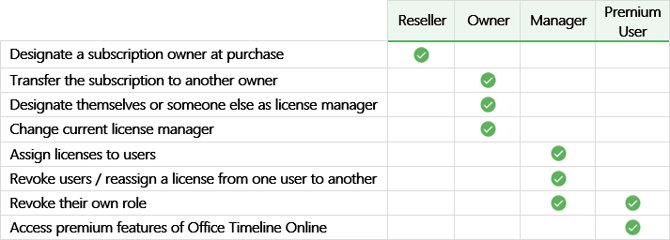
This guide defines each role and details its permissions and limitations. You can read it from start to finish to get familiar with the role system, or jump straight to the section that interests you most using the links above. For a side-by-side view of role permissions, refer to the summary table at the end of this article.
A) Reseller
Definition: The reseller is the individual merchant or company that purchases an Office Timeline Online subscription on behalf of a customer, rather than for their own use.
Permissions: Although the reseller completes the purchase, the customer specified at checkout is automatically assigned as the subscription owner and license manager. Because resellers do not receive ownership or management rights, they cannot change Office Timeline license managers or allocate licenses to users themselves.
B) Subscription Owner
Definition: The subscription owner is the person who either purchased an Office Timeline Online subscription directly or had it purchased for them by a reseller.
Permissions: A subscription owner can designate a license manager at purchase, and reassign the management role to another team member at any time. In addition, they have the exclusive right to transfer their subscription to someone else within their organization (to do so, contact us at support@officetimeline.com).
Other default roles: By default, the owner will be automatically assigned as the license manager of an Office Timeline subscription if:
- They purchase the subscription through a reseller.
- They don’t expressly designate someone to manage licenses at checkout (when purchasing themselves, directly from OfficeTimeline.com).
In addition, the license management rights will automatically be transferred to the subscription owner when the current license manager revokes their own role.
C) License Manager
Definition: The license manager of an Office Timeline Online subscription is the person responsible for administering licenses and assigning users. Once you are assigned as a license manager — either automatically or by the subscription owner — you will receive an email notification with instructions to help you get started.
Permissions: License managers are the only ones who can assign users or revoke a user's license and transfer it to someone else. They can also revoke their own license management rights, but they cannot assign a new manager themselves — this can only be done by the subscription owner.
D) Premium User
Definition: A premium user is any person who has had a paid Office Timeline Online license assigned to them by default or by a license manager.
Permissions: Premium users enjoy unrestricted access to the web tool’s premium features until their license expires or it is revoked by the license manager. Users can also revoke their own license, but they do not have permission to reassign their seat to someone else – this can be done only by the license manager.
When their license expires or is revoked, users can still access Office Timeline Online, but their account will revert to the Free plan and premium features will no longer be available.
Office Timeline Online Role Comparison Table